MCP Server Usecases
Get dates and meetings
- ical api nextcloud [x]
- ical api openproject[?]
- calendar openproject shows only start of workpackages
- needs workflow definition
- merge (sort by dates/categories)
A user can see what kind of activities he can volunteer for:
- Get workpackages that match skillset
- Get workpackages that are open (and unassigned) [x]
- Get workpackages that are marked 'help wanted'
- provide link to task or onboarding (web form)
Get users and roles
- workpackages in onboarding hold user and role information (see onboarding process)
- check DSGVO issues
- custom flag for external vs internal query permissions
- use skills and interests information to match users
- suggest a onboarding session to users without one
- https://www.openproject.org/docs/api/example/
- create account request
Embedding in a website
iframe width="400" height="215" src="https://nx.openheidelberg.de/apps/calendar/embed/cEeeKR9xGJ6E66GC"></iframe
urbaninnovation?
permissions?
MCP Features
- @mcp.tool() [x]
- @mcp.prompt()
- @mcp.resources(
) - completions
- Elicitation
- Sampling
mcp.tool
tools in mcp are model-controlled. The language model can discover and invoke tools automatically based on its contextual understanding.
Docstring and types in python are used to define tool features.
@mcp.tool()
def show_events(category: str) -> str:
"""Get Events for Openheidelberg.
Args:
category: category of event
"""
return get_events()
mcp.prompts
used to expose prompt templates to clients.
prompts are user-controlled, they are triggered through user-initiated commands in the user interface
For example, as slash commands: '/termine'
mcp.resources
Similar to RAG resources provide context to LLMs
Each resource is uniquely identified by a URI.
Resources are application-driven,
To retrieve resource contents, clients send a resources/read request:
For example: Our wiki page could provide context as a resource
Completions
completions provide a standardized way for servers to offer argument autocompletion suggestions for prompts and resource URIs. (similar to IDE code completion.)
For example: Completions could be used for event categories
Elicitation
Is a standardized way for servers to request additional information from users through the client during interactions.
Servers request structured data from users with JSON schemas to validate responses.
For example: Request from a user all Information required to create a new Event.
Sampling
is a standardized way to request completions or generations from external LLMs.
Sampling allows servers to implement agentic behaviors, by enabling LLM calls to occur nested inside other MCP server features.
For example: Read Events from a website.
Agent
howto create new meeting? (in Calendar UI obviously )
- permission
- UI seems to be a hurdle
Alternatively provide Agent with completion
Code for nextcloud
import it as a new ics-file using this command
sudo curl -T /home/rollanders/kombineradedit.ics -u User:Password https://mydomain.com/remote.php/dav/calendars/User/kombinerad/
MCP Client
Claude Desktop
a start for devs, but not actual users !
--> build our own client
stdio
Clients SHOULD support stdio whenever possible.
https://modelcontextprotocol.io/specification/2025-03-26/basic/transports#stdio
- The client launches the MCP server as a subprocess.
Streamable HTTP
In the Streamable HTTP transport, the server operates as an independent process that can handle multiple client connections
https://modelcontextprotocol.io/specification/2025-03-26/basic/transports#streamable-http
- multiple Clients
- authentication required
Architecture
flowchart LR
UI --> MCPClient
MCPClient --> MCPServer
MCPClient --> LLM
MCPServer --> API
API --> Context
UI
- webclient https://chat.openheidelberg.de
- Android / Iphone App
- Chat Messenger App
Webclient
Python Library to build chat bot as webclient
- streamlit
- flet
[√] https://github.com/rawdlite/mcp-openheidelberg/blob/main/chat.py
Android / Iphone App
with flet.dev we can build an Android / Iphone App
getting it on the App Store might be tedious
Chat App
We could combine chatting with the LLM with chatting with members in on UI.
-> matrix chat client
MCPClient
[√] https://github.com/rawdlite/mcp-openheidelberg/blob/main/client.py
- try different models (ollama llama3.2, anthropic claude..)
- try different libraries (mcp-use, dolphin-mcp, fast-agent)
- prompt engineering
- try various parameter
MCPServer
[√] https://github.com/rawdlite/mcp-openheidelberg/blob/main/server/openheidelberg.py
- create prompt
- more features
API
[√] show_events https://github.com/rawdlite/mcp-openheidelberg/blob/main/server/ical.py
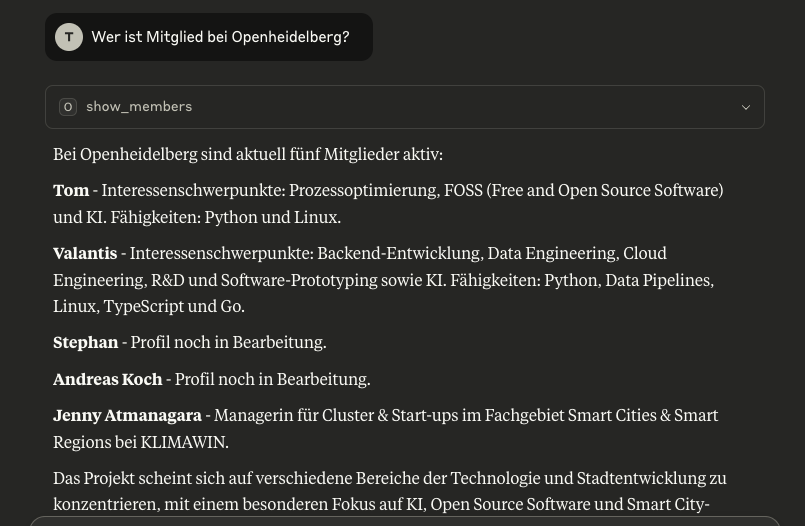
[√] show_members, show_tasks https://github.com/rawdlite/mcp-openheidelberg/blob/main/server/workpackages.py
- flags and customfields
- data massaging
Resources
- https://learnpython.com/blog/working-with-icalendar-with-python/
- https://github.com/niccokunzmann/python-recurring-ical-events
- https://modelcontextprotocol.io/quickstart/client
- https://github.com/rawdlite/mcp-openheidellberg
- https://github.com/evalstate/fast-agent
- https://github.com/lastmile-ai/mcp-agent?tab=readme-ov-file#simple-rag-chatbot
- https://mcp-use.com/
- https://matrix.org/docs/matrix-concepts/elements-of-matrix/#client
- https://github.com/matrix-nio/matrix-nio
- https://github.com/nexy7574/nio-bot
- https://github.com/criteo/openapi-to-mcp
https://github.com/cognitivecomputations/dolphin-mcp
https://systemprompt.io/
https://github.com/MCPCat/mcpcat-python-sdk
Next steps
- Create more Data (real meetings)
- Integrate more data sources
- define categories ( i.e business, technical, paper reading, salon )
- build client (chat bot) [x]